|
|
|
| |
||
Vetstar/VADDS GUI Client Installation
- Students should access Remote Desktop server dino for access to both Vetstar and PACS - please visit http://vetmed.illinois.edu/net/?q=node/327 for instructions.
- Supported operating systems are Windows XP, Vista, and Windows 7. Please select the correct installer for your operating system..
- The installation is done in 3 steps, in this order: (1) PROIV client, (2) UI CVM Modifications, and (3) Star Reports editor
Windows XP:
Perform the following steps in this order:
- If you have already installed an older version of Vetstar, uninstall it first.
- Click on the following link to download and install PROIV Client version 6.2:
PROIV Client 6.2.27.0.msi
Do NOT change its default installation directory.
- When the PROIV installation is complete, click on this link to install files specific for UI College of Vet Med:
VSModsXP_32Bit_2012.msi
- Download and install the Star Reports editor:
Star Reports 3.5.2.msi
Windows Vista and Windows 7:
Perform the following steps in this order:
- Determine which version of Vista/Windows 7 you have on your computer (32-bit or 64-bit). See http://support.microsoft.com/kb/827218 for help.
- If you have already installed an older version of Vetstar and/or Proiv, uninstall first.
- Click on the following link to download and install PROIV Client version 6.2.27.0:
PROIV Client 6.2.27.0.msi for Windows XP, Vista, or Windows 7 32-bit
If your computer's OS is Windows 7 64-bit download and install PROIV Client version 6.2.47.0:
PROIV_Client_6.2.47.0_Setup.exe
Do NOT change its default installation directory.
- When the PROIV installation is complete, download and run one of following installers for your version of Vista (visit http://support.microsoft.com/kb/827218 for instructions on how to determine which version of Vista is on your computer):
VVModsVistaWin7_32Bit_2012.msi for Vista/Windows 7 32-bit computers.
VVModsVistaWin7_64Bit_2012.msi for Vista/Windows 7 64-bit computers.
- Download and install the StarReports editor:
StarReports3.5.2_VistaWindows7.msi
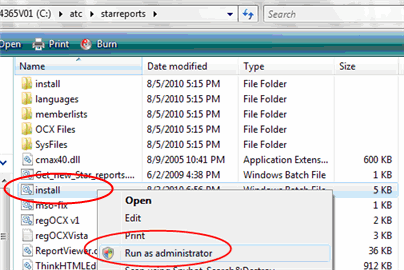
- Navigate to the following directory:
C:\atc\StarReports
Right Click on the file named install (or install.bat) and select 'Run As Administrator':
Wait for the installation to complete.
Connecting to Vetstar:
- You must use one of the following encrypted, secure connection methods before you can access Vetstar:
- IllinoisNet: If you are accessing Vetstar using the wireless network within the UI Veterinary Medicine complex, use IllinoisNet wireless service. IllinoisNet is a full-featured wireless network, with both authentication and security built into the wireless protocol itself. Once you've configured your computer to use IllinoisNet, you'll be able to log in automatically, with no add-on services like QuickConnect or the VPN necessary. For more information visit: http://www.cites.illinois.edu/wireless/index.html
- ATTENTION: UIwpa2 users - reconfigure to useIllinoisNet.
The UIwpa2 campus wireless network name was retired on Tuesday August 10. If you had been connecting to the campus wireless network through UIwpa2, you will need to configure your computer to use the new IllinoisNet network name. Visit http://www.cites.illinois.edu/wireless/wpa2/ for more information.
- VPN: If you are accessing Vetstar from outside the University of Illinois campus network, run the CITES VPN (Virtual Private Network) client. See http://www.cites.uiuc.edu/vpn/index.html for instructions on installing and running the VPN client.
- The first time you use Vetstar, you will be prompted by the Windows firewall to unblock the PROIV program (“Client ActiveX Document Server”). Please proceed with unblocking it.
Updated 5/1/12 DML
Vetstar Information Home | Computing Services