|
|
|
| |
||
When printing Vetstar custom reports that use the Report Viewer, the path and file name of the temporary file used may print at the bottom of the page:
Perform the following steps to remove it (note that this must be set under each user’s login):
- Open Internet Explorer.
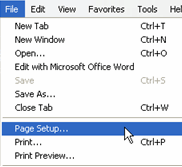
- From the menu bar, select File -> Page Setup:
If you do not see the menu bar, right click at the top of Internet Explorer and click on ‘Menu Bar’:
- For Internet Explore 7 and earlier:
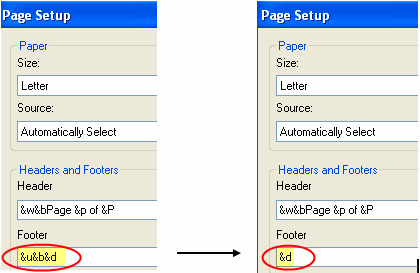
Change the Footer codes from “&u&b&d” to “&d” only:
- For Internet Explorer 8:
Change the Footer setting 'URL' to -Empty-:
- Close Internet Explorer. Now only the current date will print at the bottom of Vetstar invoices.
Updated 4/13/10 DML
Vetstar Information Home | Computing Services